
Configure an iterator
An iterator is an action configured to run on each record in a table. You can configure iterators to use a global parameter or a local variable. Each method achieves similar results, but only the local variable method allows you to specify a data type for the parameter value.
 Create an iterator using a global parameter
- Create a parent and child relationship between two macros. The child macro should consist of one or more actions that you want to iterate on each record in a data set.

- Define a global variable in the embedded macro and configure the macro to iterate against a specified data set:
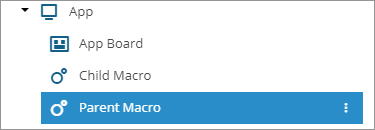
- In the Layout Designer pane, in the Projects section, select the parent macro.
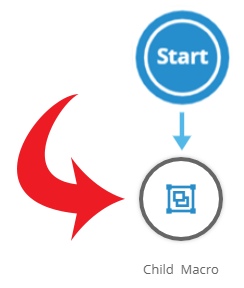
- On the design surface, select the embedded macro.
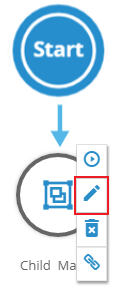
- In the edit ribbon, select Edit the action.
The properties dialog box for the embedded macro is displayed.
- On the Iterate tab, in the Iterate Over section, select Add Statement.
In the statement editor, an empty box is displayed.
- In the box, type the global variable. Ensure the name begins with two at signs (@@). For example, "@@venref".

- Click
 .
.A box with a list of tables from the specified connection is displayed.
- Select a table.
A box with a list of columns from the selected table is displayed.
- Select a column.

- If you want to limit how many times the macro can iterate, type a number in the Only The First ___ Records box.You can specify any number for a maximum value. The default value is 100,000.
- Adjust additional properties as necessary.
- Click OK.
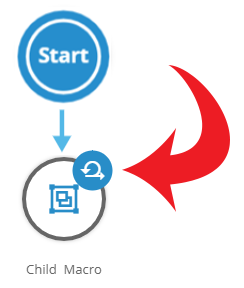
On the design surface, the iterator symbol is now displayed with the child macro.
- In the Layout Designer pane, in the Projects section, select the parent macro.
- Configure each action in the child macro that you want to execute on the data set to process the global variable:
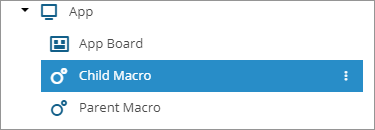
- In the Projects section, select the child macro.
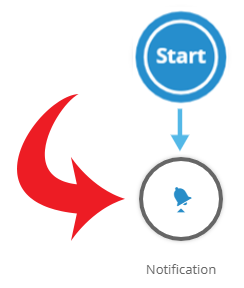
- On the design surface, select an action.
- In the edit ribbon, select Edit the action.

The properties dialog box of the action is displayed.
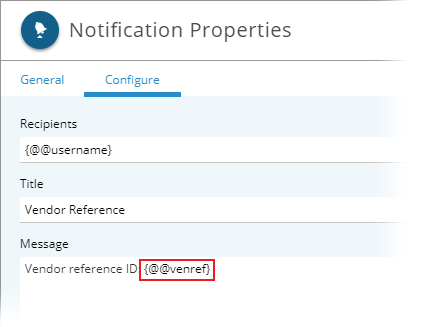
- On the Configure tab, specify the global variable for any property that acts upon the processed data. Enclose the variable in curly brackets. For example, "{@@venref}".
- Click OK.
- Repeat these steps for each action in the child macro that you want to process the local variable.
- In the Projects section, select the child macro.
- Use an event to configure how you want to execute the parent macro.
- Click Save.
When the parent macro runs, the child macro iterates against each record in the specified data set.
Create an iterator using a local variable
- Create a parent and child relationship between two macros. The child macro should consist of one or more actions that you want to iterate on each record in a data set.
- Define a local variable in the parent macro:
- In the Layout Designer pane, in the Projects section, select the parent macro.
- Click
 , and choose Properties.
The Macro Properties dialog box is displayed.
- On the Parameters tab, select Add Local Variable.
- In the Parameter Properties dialog box, provide values for the following:
- Parameter Type — ensure this is set to Local Variable.
- Name — type a name for the local variable. Ensure the name begins with a single at sign (@). For example, "@venref".
- Data Type — specify a data type.
- Initial Value — leave this blank.
- Close the dialog boxes.
- In the Layout Designer pane, in the Projects section, select the parent macro.
- Configure each action in the child macro that you want to execute on the data set to process the local variable:
- In the Projects section, select the child macro.
- On the design surface, select an action.
- In the edit ribbon, select Edit the action.
The properties dialog box of the action is displayed.
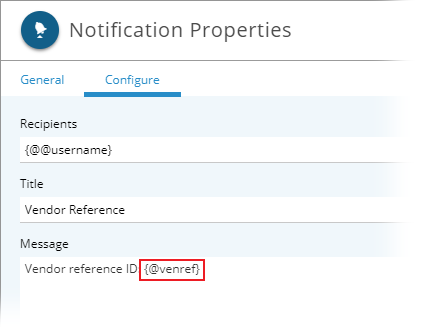
- On the Configure tab, specify the local variable for any property that acts upon the processed data. Enclose the variable in curly brackets. For example, "{@venref}".
- Click OK.
- Repeat these steps for each action in the child macro that you want to process the local variable.
- In the Projects section, select the child macro.
- Configure the child macro to iterate against a specified data set:
- In the Projects section, select the parent macro again.
- On the design surface, select the embedded macro.
- In the edit ribbon, select Edit the action.
The properties dialog box for the embedded macro is displayed.
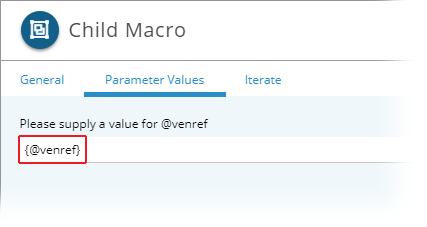
- On the Parameter Values tab, in the Please specify a value for __ box, type the local variable. Enclose the variable in curly brackets. For example, "{@venref}".
- On the Iterate tab, in the Iterate Over section, select Add Statement.
In the statement editor, an empty box is displayed.
- In the box, type the local variable. For example, "@venref".

- Click .
A box with a list of tables from the specified connection is displayed.
- Select a table.
A box with a list of columns from the selected table is displayed.
- Select a column.

- If you want to limit how many times the macro can iterate, type a number in the Only The First ___ Records box.You can specify any number for a maximum value. The default value is 100,000.
- Adjust additional properties as necessary.
- Click OK.
On the design surface, the iterator symbol is now displayed with the child macro.
- In the Projects section, select the parent macro again.
- Use an event to configure how you want to execute the parent macro.
- Click Save.
When the parent macro runs, the child macro iterates against each record in the specified data set.
Last modified: Friday May 12, 2023