
Supply Chain Prescriptions workflow - Risk
The Risk workflow can be represented as follows:
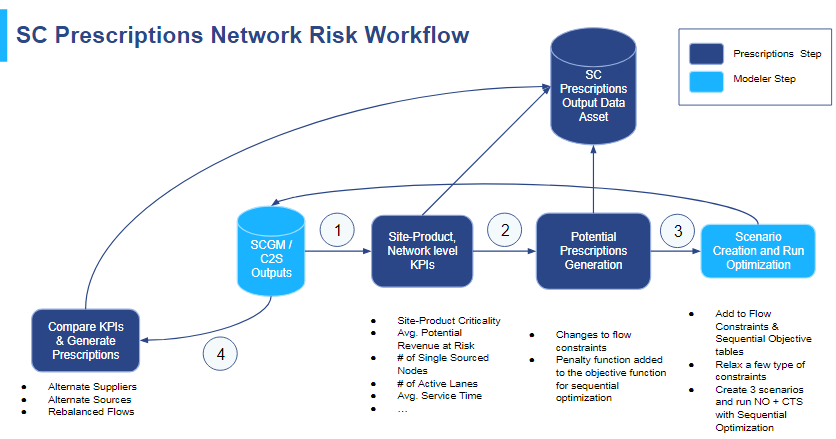
In order to read the necessary tables and input files from the Supply Chain Guru model (SCGM) required for the Risk workflow, Network Optimization (NO) along with Cost to Serve (CTS) must first be run on the model for the selected scenario.
Step 1: Read data from NO + C2S run
Similar to the Cost workflow, Supply Chain Prescriptions Risk uses input files and SCGM tables. These input files are generated as a Network Optimization input stage. In addition, the engine also reads the user’s input parameters to run the Risk workflow.
Step 2: Descriptive Risk Engine
There are four main stages in the Descriptive Risk engine:
-
Site-product classification
-
Calculation of optionality
-
Critical site-product combinations are identified using user inputs
-
Multiple risk-related KPIs are calculated using the tables and SCGM input files from Step 1. The KPIs are calculated and reported at two different levels:
- Network
- Site-Product
Step 3: Prescriptive Risk Engine
There are three stages corresponding to the generation of potential prescriptions:
- Generation of constraint parameters
- Generation of flow constraints
- Generation of sequential objectives
Once flow constraints and sequential objectives are generated, the algorithm takes the prescriptions and creates scenarios from them. These scenarios are populated in the original input model. Network Optimization + Cost to Serve is then run using these scenarios to generate a new output with the network changes.
Step 4: Post-Risk Analysis
The last phase is a comparison of the changes between the current scenario and the potential scenarios. The comparison is done at the KPI level, as well at flow level. Using this comparison, the final prescriptions are generated.
The steps of post-risk analysis are as follows:
-
Run Descriptive Risk for each scenario.
-
Analyze inter-site and customer flow differences against the current scenario
-
Use the comparisons to generate final prescriptions
Last modified: Tuesday August 22, 2023