
Supply Chain Prescriptions workflow - Cost
The Cost workflow can be represented as follows:
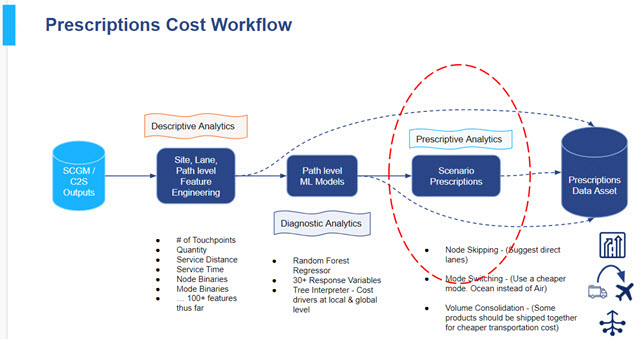
Node Skipping
Node skipping prescriptions are generated at the path level. A path is defined as an arc that a product traverses through between two end points of a supply chain (usually between a manufacturer/supplier and a customer). Prescriptions considers potential inefficiencies in a given path and recommends a direct route between two nodes (in supply chain parlance, a node is a site, such as a supplier, manufacturer, or distribution center).
Example
Consider an end to end path between A and B as shown below for products P1, P2, and P3. The diagram below represents the current supply chain before a node skipping prescription is made. In Prescriptions, the current state is represented by the “Before Node Skipping was Prescribed“ map tile in the Node Skipping Details page.
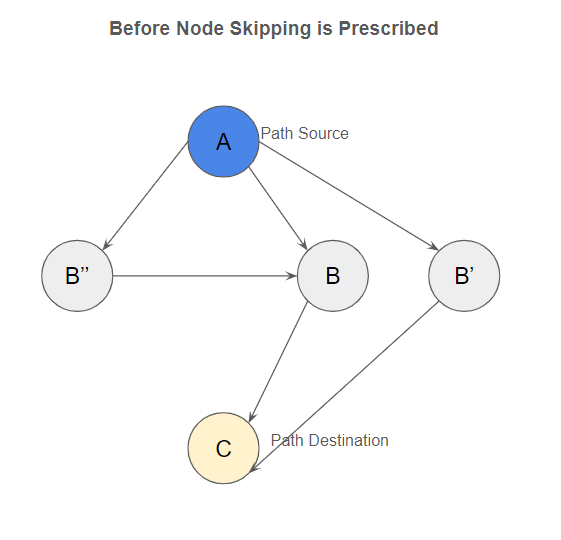
There are three branches to the end to end path between A and C in the example:
-
A → B → C for Product P1
-
A → B' → C for Product P2
-
A → B'' → C for Product P3
Prescriptions then mines through the path patterns and recommends a direct shipment between A and C and includes products P1, P2, and P3 in the same prescription.
The Affected Lanes grid shows the following:
| Lane Start | Lane End |
| A | B |
| A | B' |
| A | B" |
| B | C |
| B' | C |
| B" | C |
For product P1, the
Default State
If P2 is selected
If P3 is selected
Last modified: Friday May 12, 2023