
Lifecycle Management background
There are two Supply Chain Prescriptions engine changes for Lifecycle Management:
-
read the rejection criteria table
-
remove prescriptions based on criteria and threshold
Read the Rejection Criteria table
The Rejection Criteria table is a user input table where the user sets quantitative thresholds by criteria for rejecting prescriptions in bulk. In addition to the criteria, the user has the flexibility to set the threshold for either a single prescription type (Example: Node Skipping) or expand to all prescription types. Similarly, the threshold can be set for either a single mode or across all modes used in the model. The criteria set by the user is valid across all scenarios in the model and are applied to the current run and to all future runs, unless one or more criteria are rejected by the user.
The Scenario Prescriptions Engine will read this table along with the Transportation Arcs input file (to identify the list of modes used in the model) to ensure any prescriptions that do not meet these thresholds are not generated in the future runs.
Prescriptions can be rejected based on the following 4 values:
-
Quantity
-
Volume
-
Weight
-
Cost savings
The only arithmetic operation that are supported for the thresholds is “<=”.
The following assumptions are made when the engine reads the data from the Rejection Criteria table:
-
It is expected that the user will provide thresholds for each criterion as per the model’s default unit of measure.
-
When more than one threshold is valid for the 'Type-Mode-Criteria' combination, the engine will choose the highest value as the threshold.
-
Because Volume Consolidation (VC) prescriptions are at path segment level, there are no specific mode associated with Volume Consolidation prescriptions at summary level. The mode for any Volume Consolidation threshold set by the user in the Rejection Criteria table is restricted to “ALL”.
Below is an example of the Rejection Criteria table with Cost Savings as criteria:
| Type | Mode | Criteria | Threshold |
|---|---|---|---|
| All | ALL | Cost Savings | 10000 |
| All | Ocean | Cost Savings | 30000 |
| All | FTL | Cost Savings | 12500 |
| Node Skipping | ALL | Cost Savings | 5000 |
| Node Skipping | FTL | Cost Savings | 8000 |
| Node Skipping | Ocean | Cost Savings | 25000 |
| Mode Switching | LTL | Cost Savings | 7500 |
| Volume Consolidation | ALL | Cost Savings | 25000 |
| Mode Switching | FTL | Cost Savings | 16000 |
In the above example, let’s assume there are 4 modes used in the model – OCEAN, FTL, LTL, AIR.
When the Type is “ALL”, the engine will expand the threshold to all 3 prescription types. Similarly, when the mode is “ALL”, the engine will expand the threshold to all the modes used in the model. The engine will expand the conditions of “ALL” type to Node Skipping, Mode Switching, and Volume Consolidation and “ALL” modes to OCEAN, FTL, LTL, AIR, except for Volume Consolidation where the Mode of value "ALL" will not be expanded.
Below is the expanded table where all overlapping / conflicting thresholds that satisfy the same mode – type combination are captured:
| Type | Mode | Threshold |
|---|---|---|
| Node Skipping | Ocean | (10000, 25000, 30000, 5000) |
| Node Skipping | FTL | (10000, 12500, 8000, 5000) |
| Node Skipping | LTL | (5000, 10000) |
| Node Skipping | AIR | (5000, 10000) |
| Mode Switching | Ocean | (10000, 30000) |
| Mode Switching | FTL | (10000, 12500, 16000) |
| Mode Switching | LTL | (7500, 10000) |
| Mode Switching | AIR | (10000) |
| Volume Consolidation | ALL | (10000, 25000) |
Note: This expanded table is only for representation purposes.
As the engine will select the highest value as the threshold in case of overlapping thresholds, below is the ‘Type – Mode’ threshold for cost savings that are consumed by the engine.
| Type | Mode | Criteria | Threshold |
|---|---|---|---|
| Node Skipping | Ocean | Cost Savings | 30000 |
| Node Skipping | FTL | Cost Savings | 12500 |
| Node Skipping | LTL | Cost Savings | 10000 |
| Node Skipping | AIR | Cost Savings | 10000 |
| Mode Switching | FTL | Cost Savings | 16000 |
| Mode Switching | LTL | Cost Savings | 10000 |
| Mode Switching | Ocean | Cost Savings | 30000 |
| Mode Switching | AIR | Cost Savings | 10000 |
| Volume Consolidation | ALL | Cost Savings | 25000 |
This means that any prescriptions that are greater than the threshold will only be accepted.
Below is the overview of Scenario Prescriptions engine and the places where Prescription Life Cycle Management will impact the engine.
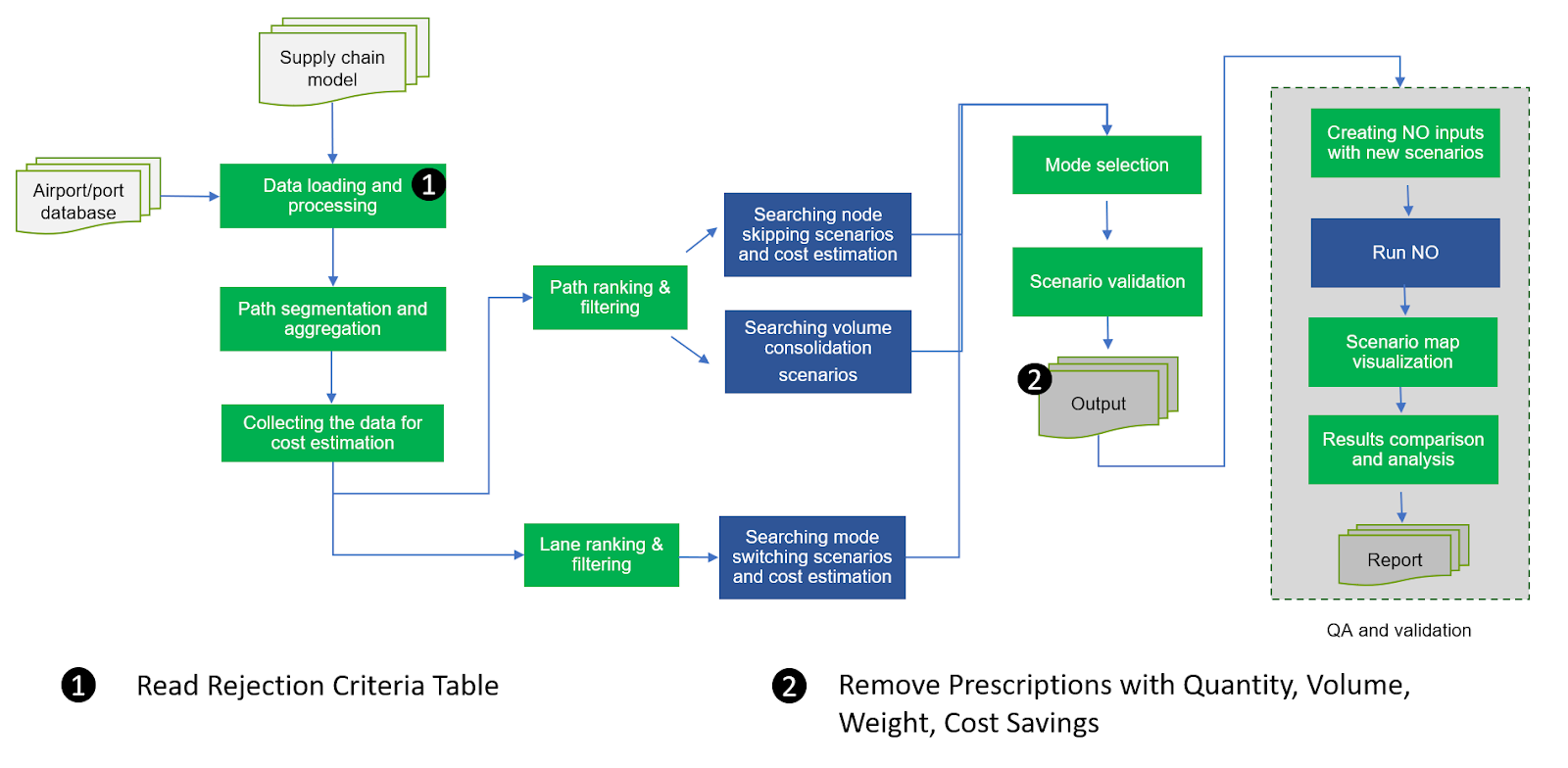
Remove prescriptions based on criteria and threshold
To compare the cost savings, quantity, volume, and weight, the scenarios must be validated and aggregated by Source-Destination-Mode. Once aggregated, the values are compared against thresholds (see ‘2’ in the figure above). Once the scenarios for each prescription type (Node Skipping, Mode Switching, and Volume Consolidation) are validated, the output tables are generated.
The validated scenarios are then appended to the Prescriptions Details Table and the Prescriptions Detail table is summed by Source-Destination-Mode (master id) for each prescription type to generate the Prescription Summary Table.
Next, the aggregated Quantity, Volume, Weight and Cost savings for each prescription type in the Prescriptions Summary table are compared against the threshold from the rejection criteria table.
For a prescription to be accepted, all conditions on the ‘Type – Mode’ combination should be satisfied.
If the summed value is less than or equal to ("<=") the threshold, then the algorithm identifies the group of prescriptions by master id generated earlier and removes them from the list of potential prescriptions.
Example:
In this example, only Node Skipping scenarios that are validated are considered. The prescriptions in the Prescriptions Details table are summed by Source - Destination - Mode to generate the Prescriptions Summary table.
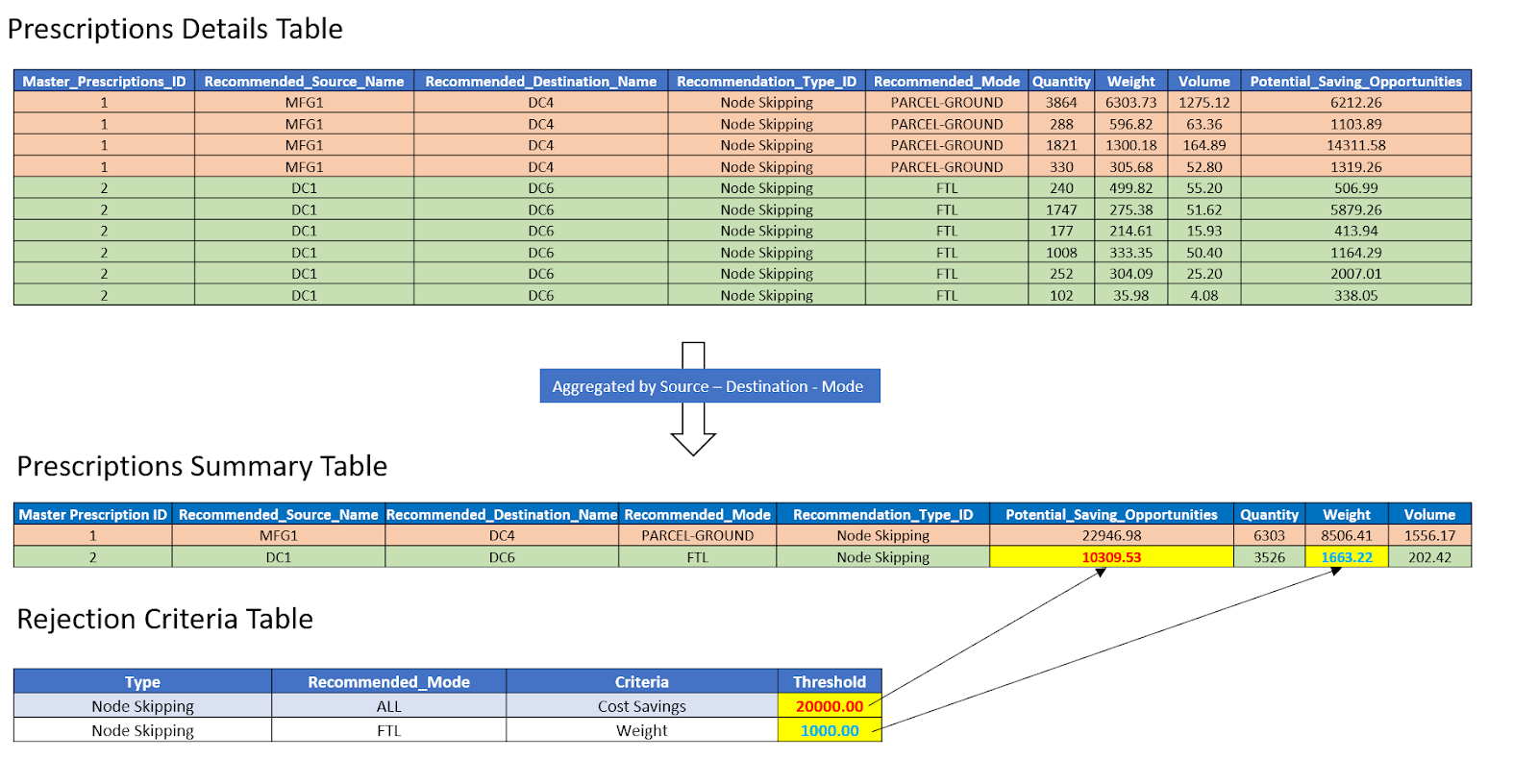
The values in the Prescriptions Summary table are compared against the threshold from the Rejection Criteria table where the user has set thresholds for Cost Savings and Weight.
There are two thresholds set by the user for Node Skipping prescriptions. The first threshold is 1000 lbs for the “FTL - Weight” combination. The second threshold is $20,000 for the “ALL – Cost Savings” combination. Each node skipping prescription must have cost savings greater than $20,000, and if the mode for said prescription is FTL, it must also have a weight greater than 1000 lbs.
The first prescription in the Prescription Summary table has mode as “Parcel-Ground” and must satisfy the minimum cost savings threshold to be reported. As the Potential Cost Savings for this prescription is $22,946.98 and satisfies the second threshold set by the user, this prescription is accepted and is reported in the next run.
For the second prescription in the Prescription Summary table, the recommended mode is “FTL” and must satisfy both the thresholds (Weight for FTL as mode and Cost Savings across all modes) to be accepted. The second prescription satisfies the condition of minimum weight greater than 1000 lbs., but it fails to meet the minimum cost savings threshold of $20,000. Hence, this aggregated prescription is removed from the Prescriptions Summary table and its corresponding prescriptions from Prescriptions Detail Table.
Below is the updated Prescriptions Summary and Prescriptions Detail Table after removing the prescription that did not satisfy the threshold.

Last modified: Friday May 12, 2023