
Validating input data
For data columns that support domain sources, values that are not included in the domain source are considered invalid. The cells with invalid values are highlighted. Rows with invalid values display an exclamation point.
Validating table data
There are two ways to validate the data in input tables:
- Validate Table – Use the Validate button on an individual input table to validate that table.
- Validate Data – Use the Validate Data button on the Modeler landing page to validate data in all input tables in the selected model.
Once validation is complete, if invalid data is detected, you see the number of validation warnings at the bottom of the table grid for each input table. This is the number of rows with invalid values. The "Last Validated" value is also displayed at the bottom right. Rows with invalid values display an exclamation point at far left and cells with invalid values are highlighted. The input table navigation pane displays an exclamation point next to the names of any tables with the number of warnings in the table. The group in which the table is displayed will also display an exclamation point with the number of tables with invalid values.
 Validating an input table
- Open an input table.
- Click Validate. The validation task for the current input table is started and you see a process indicator in the data bar at the bottom of the grid. During validation, you can review the task in Queue Management. The Tasks tab will show this task as "Model Validation".
- Once complete, you see the number of “Validation Warnings” at the bottom of the table.
Validating the model input tables
- On the Modeler landing page, select the model you want to validate, then click Validate Data. Validation is run on all input tables with data. The validation task for the current input table is started.
- During validation, you can review the task in Queue Management. The Tasks tab will show this task as "Model Validation". When validation is complete, a success message is displayed.
- When you open the model, you see the number of “Validation Warnings” at the bottom of input tables once validation for the specific table is complete.
Reviewing validation warnings
Once you have performed validation using one of the methods described, you can display input tables with warnings and review the rows with invalid data in the input tables. The Input Tables section of the navigation pane indicates which tables have validation warnings and the number of warnings in each of those tables.
Show input tables with warnings
Select Show Tables with Warnings from the input table Sort By menu. The set of input tables is limited to those with warnings.
Review validation warnings
- Open the input table with validation warnings you want to review.
- Open the Filter row.
- Select the drop down list at the left of the row and select Invalid. The filter results are limited to records that have invalid values. The drop down list also includes a Valid option, to limit the results to records that have no invalid values.
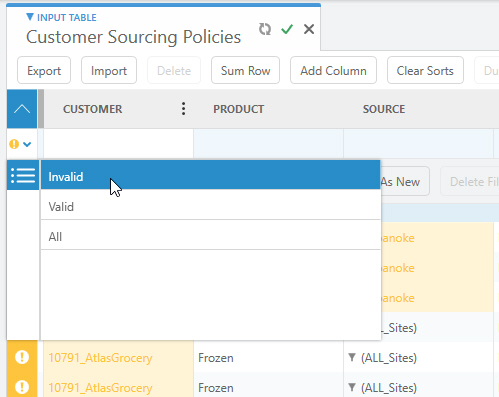
Hiding validation data
You can hide the validation warning icons and highlighting within the input table.
- Open an input table.
- Click Hide Validation in the data bar at the bottom of the table. The warning icons and highlighting associated with invalid values is no longer displayed.
- To display the validation icons and highlighting, click Show Validation.
Last modified: Tuesday August 22, 2023